
The Download Manager
The Downoad Manager is an optional add-on to the Content Manger.
It allows files such as PDFs and Word documents to be downloaded from a webpage.
Downloadable files are useful if you want readers to be able to easily take something away to read offline or print. However their use should be limited - large files which are slow to download may annoy people and when people click to download a file they are taken away from your website. Common uses for downloads are:
- Information sheets
- Flyers you want distributed
- Registration and Membership forms
- Competition entry forms
- Newsletters
Creating a Downloadable File
The Downloads Manager works in a similar way to the Image Manager - you must upload your file to a media library before you can create a link to download it.
- Click on the Downloads Manager icon
 in the toolbar.
 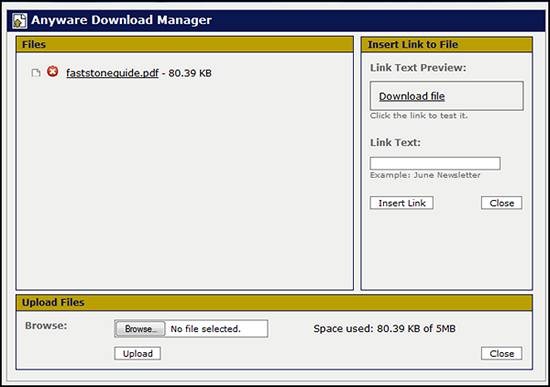 In the Upload section at the bottom of the dialogue box, upload the file from your computer. Once your file is uploaded it will appear in the list in the Files section on the top left of the box.
You are now ready to create the link.- On the webpage place the cursor where you want the link to appear and click.
- Open the Download module again and select the file from the list.
- You'll notice that the text in the Link Text Preview box changes from 'Download File' to the name of the file you selected.
- Enter the text you want to display as your link text in the Link Text box and click Insert Link.
At this time it is not possible to check this in Preview mode. Publish your page and then check the link downloads the correct file.
Preview and publish your changes.
Last Updated: 2013-08-07


